Showing posts with label css3. Show all posts
7 Fresh CSS3 Tutorials You Should Learn Immediately
Since the come out of CSS3 the life of developers become easy. In this post we have collected some useful and fresh CSS3 tutorials for developers and designer to increase there skills. Enjoy !
A Primer on CSS3 Transforms
Whatever we can do with CSS3 transforms can also be done using other web technologies. For example, using JavaScript, SVG, or Canvas, you could theoretically find ways to do anything that CSS3 transforms can do.
Two-Tone Borders with CSS3
We love using texture in our designs at Paravel. When you settle on a good texture, there’s nothing better than a slighly embossed line to give a letterpress like feel in between sections.
Combining the Cicada Principle with CSS3 Background Gradients
In the example, the author uses png images and repeats them. I wanted to try and do something similar but done purely in CSS. I found some really good resources dealing with CSS 3 and backgrounds, specifically this one dealing with patterns and a pattern gallery.
Recreating the HTC clock widget with CSS3
One of the reason HTC’s phones are so popular right now is their slick interface. The most iconic part of their interface is their clock and weather widget. With the help of some CSS3 we can recreate the whole thing using RGBa transparencies, box-shadows, and gradient backgrounds with multiple color stops. What does this all mean? Well it means like all good things that come in web design, it doesn’t work in IE, however all of the other major browsers work (Chrome, Firefox, Safari and Opera).
Pure CSS3 accordion
A while ago, I wrote about the CSS3 :target pseudo-class and how can that help you achieve cool results. Today you’ll learn how to create a pretty simple animated accordion with its help.
A Primer on CSS3 Transforms
Whatever we can do with CSS3 transforms can also be done using other web technologies. For example, using JavaScript, SVG, or Canvas, you could theoretically find ways to do anything that CSS3 transforms can do.Two-Tone Borders with CSS3
We love using texture in our designs at Paravel. When you settle on a good texture, there’s nothing better than a slighly embossed line to give a letterpress like feel in between sections.Combining the Cicada Principle with CSS3 Background Gradients
In the example, the author uses png images and repeats them. I wanted to try and do something similar but done purely in CSS. I found some really good resources dealing with CSS 3 and backgrounds, specifically this one dealing with patterns and a pattern gallery.Recreating the HTC clock widget with CSS3
One of the reason HTC’s phones are so popular right now is their slick interface. The most iconic part of their interface is their clock and weather widget. With the help of some CSS3 we can recreate the whole thing using RGBa transparencies, box-shadows, and gradient backgrounds with multiple color stops. What does this all mean? Well it means like all good things that come in web design, it doesn’t work in IE, however all of the other major browsers work (Chrome, Firefox, Safari and Opera).Pure CSS3 accordion
A while ago, I wrote about the CSS3 :target pseudo-class and how can that help you achieve cool results. Today you’ll learn how to create a pretty simple animated accordion with its help.CSS3 Tutorial : The Ultimate Guide
CSS3 is the latest edition to web development languages. Its not easy to learn a new language on your own, but if you are willing to learn new things then you can try to learn everything with the help of internet. To be honest I haven’t kept up with it all as much as I should have. These are the best tutorials I could fine on CSS3, I hope they are helpful to someone.
Introduction:
Introduction to CSS3 – What Is It?
Get the Best Out of CSS3
Kick Ass CSS3 Support in IE 6, 7, and 8
You Can Use CSS3 Right Now
CSS3 Color Module
5 Techniques to Acquaint You With CSS3
Tutorials:
Take Your Design to the Next Level with CSS3
Beautiful Looking Custom Dialog Box in CSS3
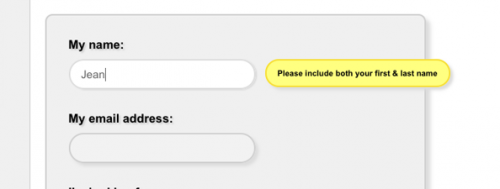
Fancy Form with Hints using CSS3
Nice 3D Ribbons in CSS3
Halftone Navigation Tutorial in CSS3
Drop Shadow for Images
CSS3 and HTML5 One Page Template Tutorial
Multi-level and Multi-column Pure CSS3 Menus
Create Pretty and Colorful CSS3 Buttons
Awesome Overlays with CSS3
Create Rounded Corners with CSS3 and jQuery
Sexy Vertical Sliding Menu using CSS3 and jQuery
Pure CSS3 Speech Bubbles
Super Awesome 3D Buttons with CSS
Overlapped Menu using CSS Sprites
CSS3 Drop Down Menu
Classy Photo Frame using CSS3
Letterpress Text Effect using CSS3
Create a Polaroid Photoviewer with CSS3
Resources:
CSS3 Cheat Sheet
CSS3 Selectors Explained
Future of CSS – The Flexible Box Model
Inspiration:
Showcase of Websites Built with CSS3
10 Amazing and Innovative Examples of CSS3 Animation
Introduction:
Introduction to CSS3 – What Is It?
Get Started with CSS3
Get the Best Out of CSS3
Kick Ass CSS3 Support in IE 6, 7, and 8
You Can Use CSS3 Right Now
CSS3 Color Module
5 Techniques to Acquaint You With CSS3
Tutorials:
Take Your Design to the Next Level with CSS3
Beautiful Looking Custom Dialog Box in CSS3
Fancy Form with Hints using CSS3
Nice 3D Ribbons in CSS3
Halftone Navigation Tutorial in CSS3
Drop Shadow for Images
CSS3 and HTML5 One Page Template Tutorial
Multi-level and Multi-column Pure CSS3 Menus
Create Pretty and Colorful CSS3 Buttons
Awesome Overlays with CSS3
Create Rounded Corners with CSS3 and jQuery
Sexy Vertical Sliding Menu using CSS3 and jQuery
Pure CSS3 Speech Bubbles
Super Awesome 3D Buttons with CSS
Overlapped Menu using CSS Sprites
CSS3 Drop Down Menu
Classy Photo Frame using CSS3
Letterpress Text Effect using CSS3
Create a Polaroid Photoviewer with CSS3
Resources:
CSS3 Cheat Sheet
CSS3 Selectors Explained
Future of CSS – The Flexible Box Model
Inspiration:
Showcase of Websites Built with CSS3
10 Amazing and Innovative Examples of CSS3 Animation
23 Best CSS3 Tutorials & Resources For Creating Awesome Button
Despite being an emerging technique still unsupported by some browsers, CSS3 gained a huge attention from designers and web developers in the last 6 months. In fact, CSS3 brings to life countless new possibilities to make even better websites. In this article, I have compiled a list of 23 Best CSS3 Button Tutorials & Resources to make extremely awesome buttons using CSS3.
CSS3 Buttons
Sometimes when you have multiple buttons, it's considered good practice to highlight the button with the primary action in order to give the user a visual clue of what action to take if in doubt. This can be accomplished by adding a .primary class to the button
CSS3 Gradient Buttons
The buttons are scalable based on the font-size. The button size can be easily adjusted by changing the padding and font-size values. The best part about this method is it can be applied to any HTML element such as div, span, p, a, button, input, etc.
CSS3 Button Maker
Creating the Perfect CSS3 Buttons
The sweet looking buttons in this tutorial are created using only HTML and CSS3 – no JavaScript or images required!
Realistic Looking CSS3 Buttons
Build Kick-Ass Practical CSS3 Buttons
What once required background images and icons can now be created with plain-old CSS. Because modern browsers have access to things like box shadow, gradients, rounded corners, text-shadows, and font-face, we can finally take advantage of this and remove any need for images, when creating visual elements, such as buttons! I’ll show you how in today’s video tutorial.
Emulating "Google-style" Buttons
This article features code examples in both Haml and HTML; Sass and CSS. If you are unfamiliar with Haml and Sass, please check out the Haml and Sass sites for more information and usage.
CSS3 buttons
This is a collection of buttons that show what is possible using CSS3 and other advanced techniques, while maintaining the simplest possible markup. These buttons look best in Chrome and Safari (especially on OSX). They look almost as good in Firefox, with all other browsers falling back to a less-styled button. If you use these buttons in the wild, drop me a note and let me know.
How To Create a Stylish Content Slider using CSS3 & jQuery
We’ll learn how to create a stylish content slider using CSS3 and some jQuery magic.
Make CSS3 buttons that are extremely fancy
You can see that these buttons have a nice gloss, as well as some drop shadows for a nice 3D effect.
Sweet CSS3 buttons that you can't use... yet
CSS3 is coming, and with it you can create marvelous page effects which were previously only possible with images. And where CSS3 fails, you can use SVG, but that's another story.
Make Aristo's Buttons in CSS3
Beautiful Photoshop-like Buttons with CSS3
In this Tutorial we’ll show you how to recreate 3 different, slick buttons that we created beforehand in Photoshop without the usage of any image in CSS3. We’ll use a multitude of CSS3 properties, such as @font-face, text- and box-shadow, gradients and border-radius.
Fading Button Background Images With CSS3 Transitions
When Firefox 4 is released this October, browsers that support the CSS3 transition property will make up approximately 30% of the market (providing current Firefox users upgrade). With this in mind, it now becomes viable to consider CSS as an alternative to using JavaScript to achieve fading :hover{} effects on buttons and other interface elements. This article explores a simple method for doing this, with fallbacks for other browsers.
Getting to Work with CSS3 Power Tools
CSS3 is one of the coolest new web technologies available to web developers right now. Using some of its many features, it is possible to reproduce the effects that you might have previously done in Photoshop, with CSS code that is more maintainable, faster to load, and hip with the latest trends. Read on to learn about the power tools available to you and how to combine them to produce the ultimate graphical effects.
css3 button generator
Create an Advanced CSS3 Menu
Creating a nice looking menu no longer needs all the code and time it use to, thanks to CSS3. This is a tutorial explaining how to create great looking buttons using just CSS3.